The Vuzix Remote Assist for Teams application is built on Microsoft’s secure Azure platform, delivering a handsfree, intuitive communication experience for frontline workers within the Azure Communications Service ecosystem to integrate with the Microsoft Teams solution set.
There are two configuration options:
Configuration 1: Vuzix Solutions as a Gateway to Your Company
This is the default, out-of-the-box setup.‑of‑the‑box setup and the configuration that should be used to evaluate the solution for a buy/don’t buy decision.
.png)
Your IT administrator simply approves access to the required Azure services for the Vuzix Remote Assist for Teams application.
How it works:
The application first connects to the Vuzix Solutions Azure tenant.
It is then redirected to your organization’s Azure tenancy for authentication.
You log in directly to your own secure environment — no personal data is shared or stored within the Vuzix tenancy or application.
Because security is our top priority, Configuration 1 is intended as a temporary convenience for solution evaluation before you decide on broader roll-out.
Vuzix will limit usage to 100 hours of video chat for the users from your domain. This provides ample time to evaluate the solution before you transition to Configuration 2 for a broader roll-out within your team or company.
Configuration 2: Operates Entirely Within Your Company Infrastructure
Configuration 2 is the recommended long-term deployment for Vuzix Remote Assist for Teams.
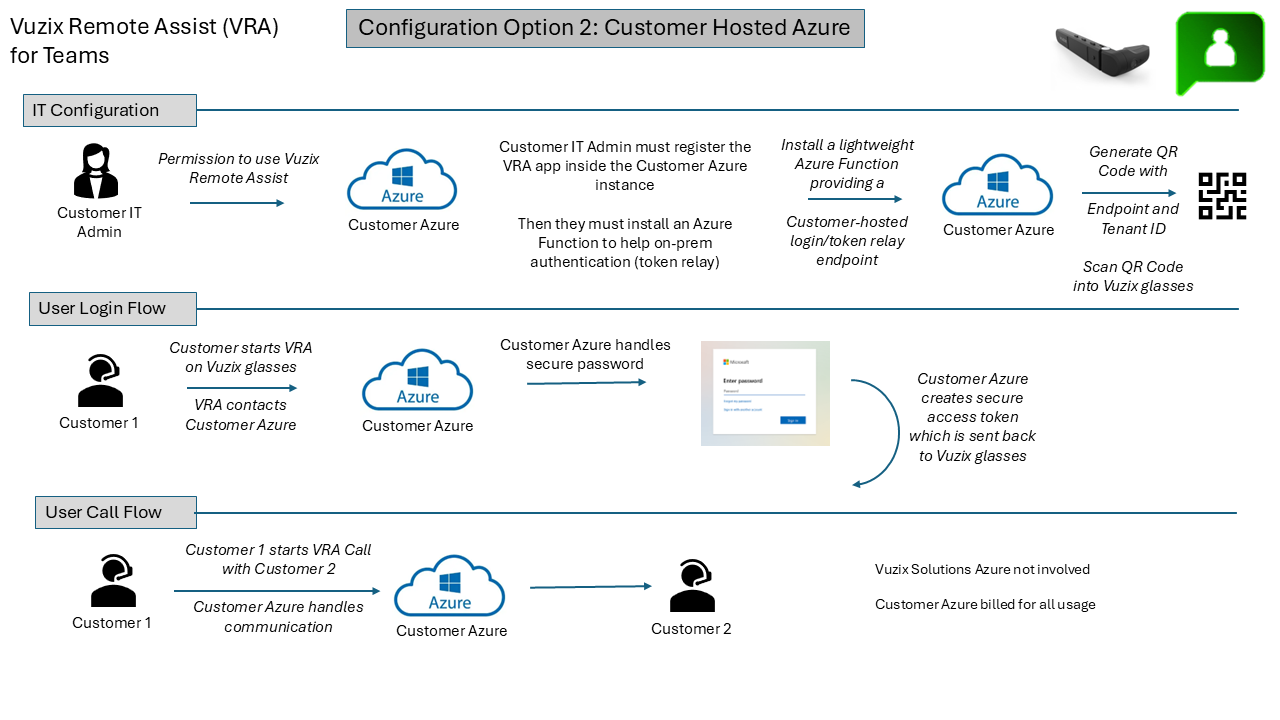
In this mode:
All Microsoft Teams authentication, traffic, and processing occur fully within your organization’s IT environment.
Your administrators can apply all desired Company security and compliance models
Vuzix servers are never used at any point in the workflow.
This configuration requires your IT administrator to deploy the solution in a Company owned tenant. During your evaluation period Vuzix Support will answer any questions you may have and can provide documentation for this implementation option. When you are ready to proceed with this configuration Vuzix will provide a step-by-step Tenant Configuration Guide and an ARM template, plus provide any assistance your Azure administrators may need for a successfull internal solution deployment.
Please contact Vuzix Product Support for any further questions.