
The Vuzix Remote Assist solution for Teams initially operates from a Vuzix Tenant to evaluate and quickly use the solution.
For broad deployment and long term use the solution needs to be installed in the corporate Azure tenant by an appropriately privileged Azure administrator.
For Initial app usage
For initial usage in VuzixSolutions.com tenant pending deployment in your corporate tenant, please approve Admin Consent for the app.
As of 5/15/2026 these are the required privileges:
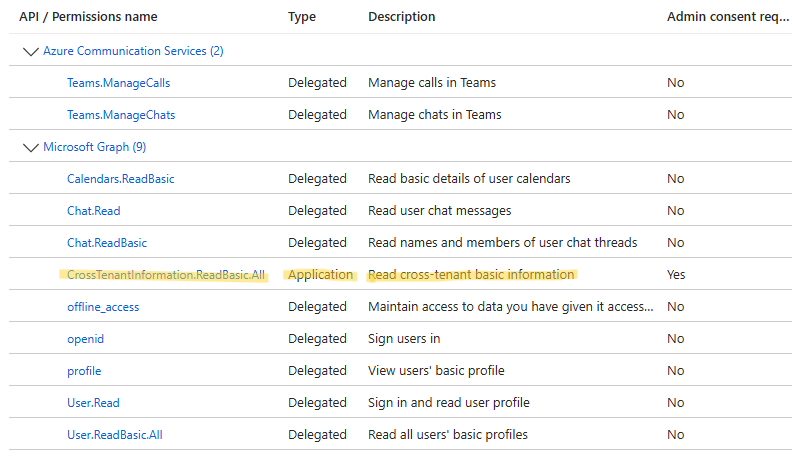
The yellow highlighted privilege is NOT required when running the solution in a customer owned tenant.
To grant Admin Consent your corporate Microsoft Entra ID (Azure AD) tenant used to provide the consent must already have an existing “Service Principal” for the Azure Communication Services (ACS) with the Graph Module installed and configured. If testing this solution in a test tenant that is not already used for Azure application approvals, it is possible that this is not already configured and then the user will experience a “Fatal Error” message upon initial app launch on the smartglasses.
Solution Deployment
When your company had decided to proceed with the purchase and you are ready to install the solution in your own tenant, Vuzix will provide the “Azure Tenant Configuration Guide” which gives step-by-steps instructions for either a fully manual or ARM based deployment process. We will also provide a Function App deployment file that manages the token exchange process.
Installing the solution in your own tenant will ensure that it is fully within your control and is subject to your security and compliance requirements and will lift the 100 hour usage cap that exists while evaluating the solution in the VuzixSolutions.com tenant. Configuring the solution in a corporate tenant will require Global Administrator or a Cloud Application Administrator role.
Please reach out by filling out a support request for Technical Support to obtain these instructions once your company is ready to proceed with a broader roll-out or if you have any questions.
Tenant Swap
Once the tenant has been set up internally, you will need to create a QR code with appropriate tenant details and send that to your users. They will scan this QR code on their smart glasses to swap from the Vuzix tenant used during the initial evaluation period to your own tenant for long term use.
We provide an endpoint on our function app to produce your personalized QR code or you can create it manually with the following JSON format and appropriate substitutions for your tenant details in green.
{
"azure_company_name": "<Your company name>",
"azure_client_id": "<App registrations application (client) ID>",
"azure_endpoint": "<Function app Default Domain>"
}
The resulting JSON will look similar to this:
{
"azure_company_name": "ABC Company",
"azure_client_id": "759c6e24-22bc-444e-9558-c2eab9796180",
"azure_endpoint": "teams-token-exchange-test-aga6a4dphqf2gfag.canadacentral-01.azurewebsites.net"
}
User will use this QR code with their smart glasses to swap from the VuzixSolutions.com tenant to the customer tenant by following these steps.
Select User profile in the Teams app on the glasses and click Log out.
Relaunch the Teams app and click on Scan configuration code and point the smart glasses camera at the QR code provided by their Azure admin
Click on Login and perform the Device Login on the Microsoft page with corporate domain credential